CHANGE ORDER & TIER VENDOR MANAGEMENT

Keep scope, billing,
and documents aligned

Connect approved change orders to your pay applications. Give your team a shared view of tier vendors, preliminary notices, and lien waiver requirements in GCPay.

2Sign Waiver
2Sign Waiver

01 / APPROVED SCOPE

Keep change orders connected to billing

Your approved contract value gives subcontractors the basis for their next pay application. GCPay reflects approved changes in the SOV and pay apps, with billing controls that help keep submitted amounts aligned with approved scope.

Change order information in GCPay

What is a change order?

A change order documents a change to contracted work. Before including that change in billing, confirm the approved scope and amount, then check that the current SOV and supporting records reflect the same agreement.

A shared contract record

Supported ERP integrations exchange contract and change order information. Available fields, sync direction, and approval processes depend on your ERP configuration.

A clearer submission standard

Set the SOV, change order approval rules, and document requirements before billing opens so subcontractors know what your team will review.


Change Order 1

02 / DOWNSTREAM VISIBILITY

Make tier vendor documents easier to review

See the vendors behind the pay app

Review reported downstream vendors using the latest approved or submitted application for payment.

Keep preliminary notices with the record

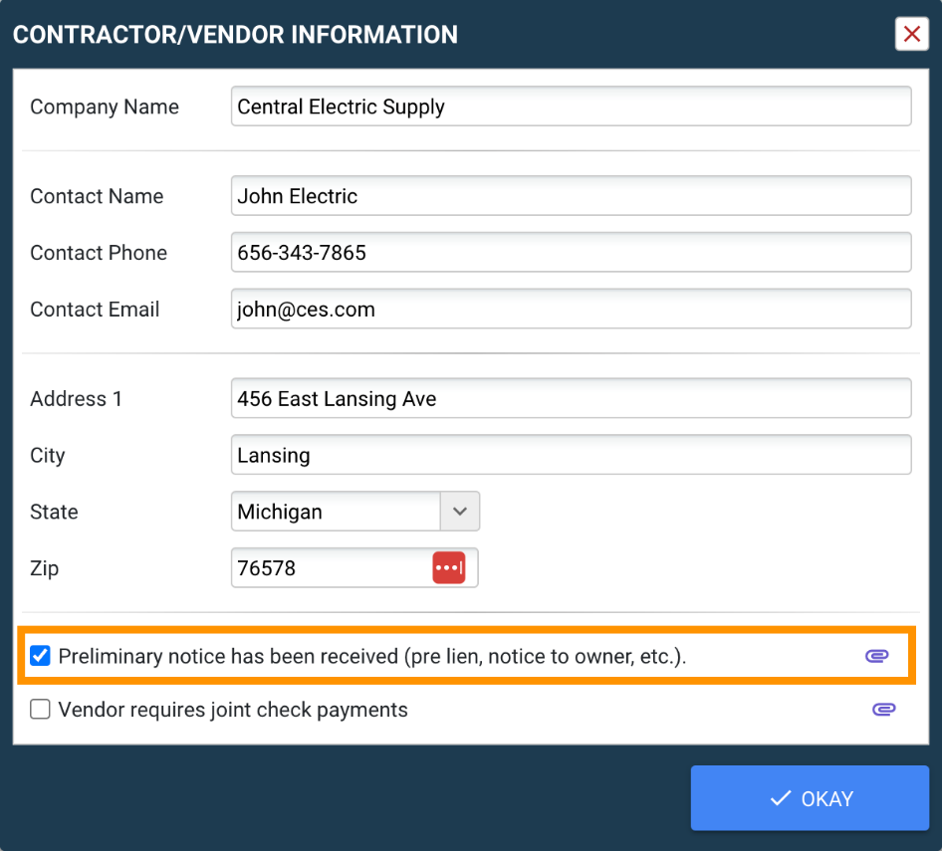
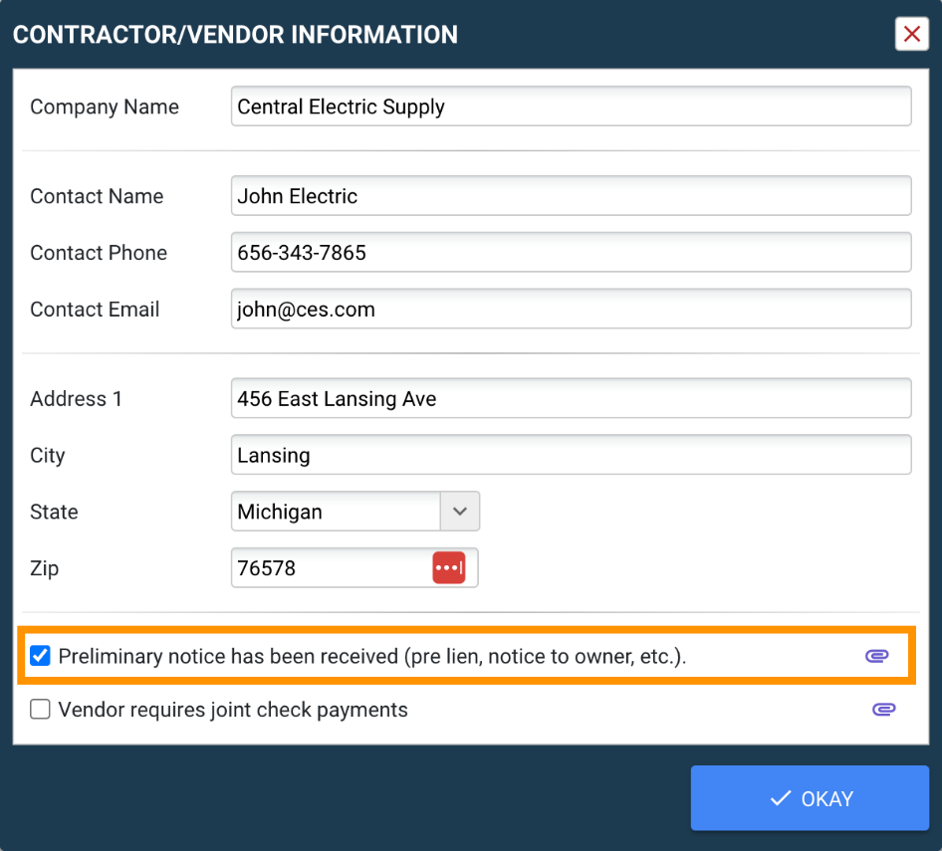
Indicate when a notice has been received and upload the document to the tier vendor record.

Connect notices to waiver requirements

Configure a tier vendor waiver or template to be required when a preliminary notice is received. Embed the tier vendor table in templates for sworn statements and contractor affidavits.

Tier vendor documentation in GCPay

LEARN / PUT THE PROCESS INTO PRACTICE

Build a better-informed payment process

Use these guides to prepare subcontractors, understand waiver choices, and connect approved contract changes to your accounting workflow.

START HERE / ONBOARDING

The GC guide to rapid subcontractor onboarding

Prepare billing rules, assign ownership, and support the first live pay application. Includes guidance on SOV structure, change orders, required documents, and what to measure after rollout.

Read the onboarding guide

WAIVER FUNDAMENTALS

Conditional vs. unconditional lien waivers

Understand how payment receipt affects waiver choices, plus practical steps for tracking vendors, preliminary notices, and supporting documents.

Explore waiver types

PROJECT DOCUMENTATION

Lien waiver requirements by state

Use GCPay’s state-by-state overview as a starting point when reviewing forms and documentation requirements with your legal team.

Review the state guide

ERP & PAYMENT DATA

The GC’s guide to Sage ERP and GCPay integration

Explore how commitments, change orders, compliance information, and payment applications connect between Sage and GCPay.

Read the integration guide

Educational resources are general guidance, not legal advice. Requirements vary by jurisdiction and contract; confirm your project’s requirements with qualified counsel.

Solutions 2

Change order management questions

How do approved change orders reach my pay apps?

GCPay reflects approved change orders in your schedule of values and payment applications, keeping billing aligned with the updated contract scope. If you connect a supported construction ERP, change order data can sync through that integration. Your specific ERP and configuration determine the data flow.

Can subcontractors bill for an unapproved change order?

GCPay provides controls that prevent billing against unapproved change orders and keep pay applications aligned with contract values. Downes Construction describes this behavior in its Sage 300 CRE integration. During your demo, review how approvals and billing controls would work with your own ERP configuration.

Where do I keep tier vendor notices and lien waivers?

You can upload a preliminary notice to a tier vendor record and indicate that it has been received. GCPay also supports tier vendor lien waiver and template requirements tied to notice receipt, plus tier vendor tables within templates. Confirm your requirements with your legal team.

Male engineer at a construction site with a tablet computer

PRACTICAL GUIDE

10 best practices for managing construction change orders

Learn how to document scope changes, assess cost and schedule impacts, and obtain written approvals.

Explore change order best practices

See change order management in GCPay

Review SOV updates, tier vendor documentation, and your ERP integration with the GCPay team.

Book a Demo